Getting Started with Onairos: The Complete Developer Guide
Learn how to integrate Onairos into your app in minutes. Access rich user profiles, prebuilt data connectors, and deep personalization from day one. Works with React, Next.js, and any JavaScript framework.


Add deep personalization to your app in under 5 minutes.
Instant access to rich user profiles, prebuilt data connectors (ChatGPT, Gemini, YouTube, LinkedIn, and more), and a growing ecosystem of engaged users — all with privacy built in.
Onairos is a user-owned context wallet that lets users connect their digital footprint — YouTube, Reddit, ChatGPT conversations, LinkedIn, and more — to create a portable AI model of their preferences and personality. As a developer, you can tap into this rich understanding to power recommendations, personalization, and AI features from day one. No cold start problem.
Why does this matter?
Because every app starts with the same problem: you know nothing about your users.
Onairos solves that. Prebuilt data connectors handle ChatGPT, Claude, Gemini, YouTube, LinkedIn, Reddit, Pinterest, Gmail, and more — no OAuth headaches. Thousands of users already have Onairos accounts with rich profiles ready to go. You get personality archetypes, behavioral patterns, preferences, and deep trait insights from day one. Users own their data; you get anonymized insights. One CLI command or a simple npm install and you're live.
Watch: DevKit Setup in Action
Complete DevKit setup walkthrough — from zero to personalized app in minutes
Two Ways to Get Started
Choose the path that fits your project:
Option A: Create a New App
One command scaffolds a full Next.js project with the SDK wired up, API key validated, and a working example component.
npx create-onairos-app@latest
Option B: Add to Existing App
Install the SDK via npm and integrate into your current codebase. Three steps: initialize, drop in the button, handle the callback.
npm install onairos
Option A: Create a New Onairos App
The fastest way to get started. Our CLI creates a fully configured Next.js project with the Onairos SDK, API key initialization, and a working example component.
Step 1: Get Your Developer API Key
Sign up at onairos.uk/developers to get your API key. Keys use the ona_ prefix and are validated against the Onairos backend.
Step 2: Create Your App
Run the create command with your API key:
npx create-onairos-app@latest my-app --api-key YOUR_API_KEY --webpage-name "My App"
Replace YOUR_API_KEY with your actual key and "My App" with your app's display name. The CLI validates your key, scaffolds a Next.js App Router project, and installs onairos@6.0.7 automatically.
Step 3: Start Development
cd my-app
npm run dev
Your app is now running with Onairos integrated. Open http://localhost:3000 to see it in action.
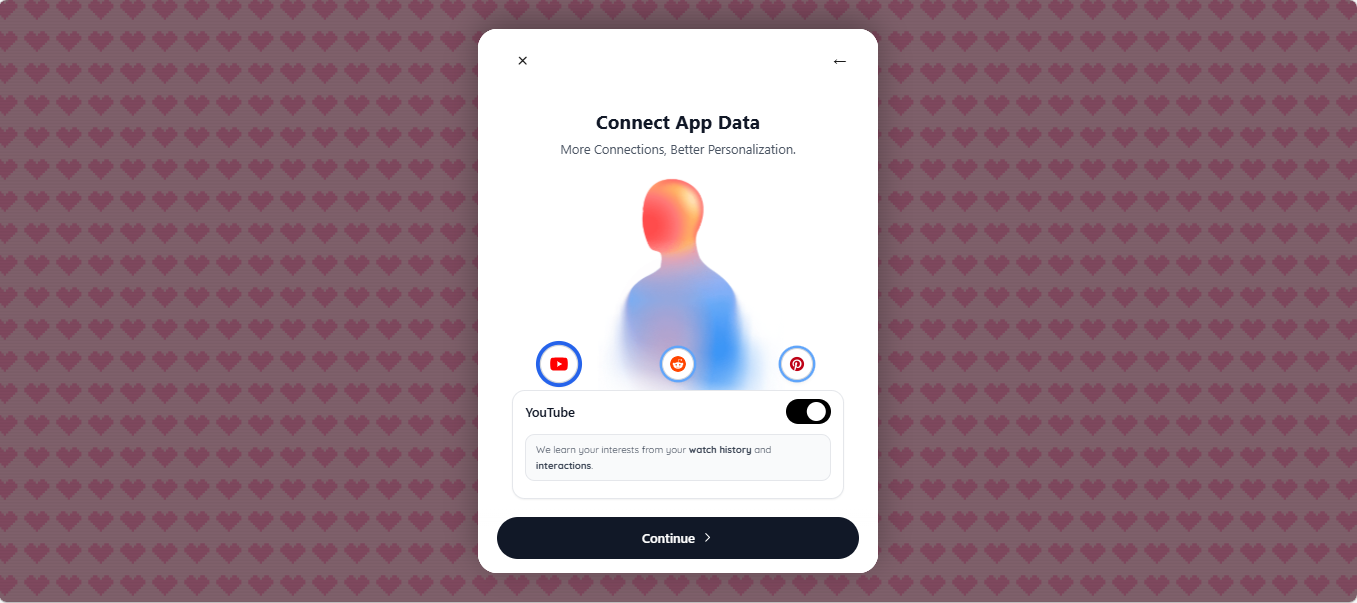
The Onairos connection overlay — users can connect their data sources with one click
Option B: Add Onairos to an Existing App
Already have a project? Three steps and you're live.
Step 1: Install the SDK
npm install onairos

# or with yarn
yarn add onairos
Step 2: Initialize the SDK
You must call initializeApiKey before rendering any Onairos components. This validates your developer API key and configures the SDK environment.
import { initializeApiKey } from 'onairos';

await initializeApiKey({
  apiKey: 'ona_your_api_key_here',
  environment: 'production',
  enableLogging: true,
});
Step 3: Add the OnairosButton
Drop the OnairosButton into any component. It handles the entire connection flow — email auth, data source linking, consent, and data retrieval.
import { OnairosButton } from 'onairos';

function ConnectPage() {
  return (
    <OnairosButton
      webpageName="My App"
      requestData={['preferences', 'personality']}
      autoFetch={true}
      onComplete={(result) => {
        console.log('Token:', result.token);
        console.log('API URL:', result.apiUrl);
        console.log('Approved scopes:', result.approved);
        console.log('API response:', result.apiResponse);
      }}
    />
  );
}
What You Get Access To
When a user completes the Onairos connection flow, your onComplete callback receives a result containing a token, apiUrl, the list of approved data types, and the apiResponse with the actual data. The response adapts based on what the user consented to.
Inference
Content Preference Scoring
Send in any content — a product, article, or course — and get a 0 to 1 score for how likely that specific user is to engage. Powered by a per-user MIND 1 model trained on their real behavior.
Analysis
Personality Trait Profile
A structured breakdown of who the user is — strengths, growth areas, an archetype label, a natural-language summary, and actionable nudges. All from real platform data.
Inference
Each user has a dedicated MIND 1 model — a lightweight, per-user neural network trained on their actual behavior across connected platforms. You send in any content and the model returns a 0 to 1 preference score for that specific user. It understands arbitrary text through semantic embeddings, so it works with whatever content your app serves.
Personality Traits
Onairos processes a user's full history across all their connected platforms and synthesizes it into a single, unified personality profile — extracted directly from real behavioral data.
The result is a structured trait analysis — every trait and score derived from real patterns in what the user actually watched, read, liked, and discussed. The more platforms they connect, the richer this profile becomes. Here's what you get back:
- Positive Traits — strengths scored 0–100, based on frequency, consistency, and depth of engagement across all connected platforms
- Growth Areas — where the user shows lower consistency; lower scores indicate higher priority areas for improvement
- Archetype — a single personality label that captures who this user is, like "Strategic Historical Analyst" or "Creative Explorer"
- User Summary — a natural-language paragraph describing who the user is, what drives them, and how they engage with content
- Nudges — actionable, personalized suggestions you can surface directly in your app's UX
Connected Platforms
You also receive which data sources the user linked — YouTube, Reddit, ChatGPT, LinkedIn, Gmail, Pinterest, and more. The more platforms connected, the richer the persona and the more accurate the inference model becomes.
Use Cases
- Content Recommendations: Use preference scores to rank and filter content from day one — no cold start.
- AI Personalization: Feed the archetype and traits directly into your LLM system prompt for personalized responses.
- Onboarding Optimization: Skip surveys. The trait profile and compressed memories tell you what users want before they type a word.
- Dating & Social Apps: Match on real personality data instead of self-reported bios. See our voice onboarding case study.
- Learning Platforms: Adapt content difficulty and style to how each user learns, based on their actual engagement patterns.
Connector Control
You can control which data connectors are shown to users. By default, all platforms are visible — YouTube, LinkedIn, Reddit, Pinterest, Instagram, GitHub, Facebook, Gmail, Notion, and the LLM connectors (ChatGPT, Claude, Gemini, Grok). Use allowedPlatforms to filter to specific ones, or rawMemoriesOnly to show only LLM connectors.
// Show only specific platforms
<OnairosButton
  webpageName="MyApp"
  requestData={['preferences', 'personality']}
  allowedPlatforms={['YouTube', 'ChatGPT', 'Gmail']}
  onComplete={(result) => console.log(result)}
/>

// Show only LLM connectors
<OnairosButton
  webpageName="MyAIApp"
  requestData={['preferences', 'personality']}
  rawMemoriesOnly={true}
  onComplete={(result) => console.log(result)}
/>
Developer Resources
- Developer Portal — get your API key and manage your applications
- Documentation — full API reference, guides, and best practices
- llm.txt — machine-readable context file for AI coding assistants
Frequently Asked Questions
How does user privacy work? Users own their data through Onairos. They explicitly consent to share specific traits with your app, and can revoke access anytime. You receive anonymized, aggregated insights — never raw personal data.
What if a user doesn't have an Onairos account? The connection flow guides new users to create an account and connect their data sources. The whole process takes under 2 minutes.
Is there a free tier? Yes. Onairos offers a generous free tier for developers. Visit the developer portal for current pricing and limits.
Which frameworks are supported? The web SDK works with React, Next.js, Vue, Svelte, and vanilla JavaScript. Native SDKs are available for React Native, Swift, and Flutter.
Can I control which connectors users see? Yes. Use the allowedPlatforms prop to filter to specific connectors, or set rawMemoriesOnly to show only LLM connectors.
Ready to add deep personalization?
Get your API key and start building in minutes.
Quick start: npx create-onairos-app@latest my-app --api-key YOUR_KEY
Author
Zion Darko
Founder & CEO
Inventor and Dreamer and CEO.