Introducing Smart Private Filter: Share the Signal, Not Your Life
Smart Filter gives people precise control over which sources and topics can shape their Onairos persona, so apps get useful context without getting everything else.

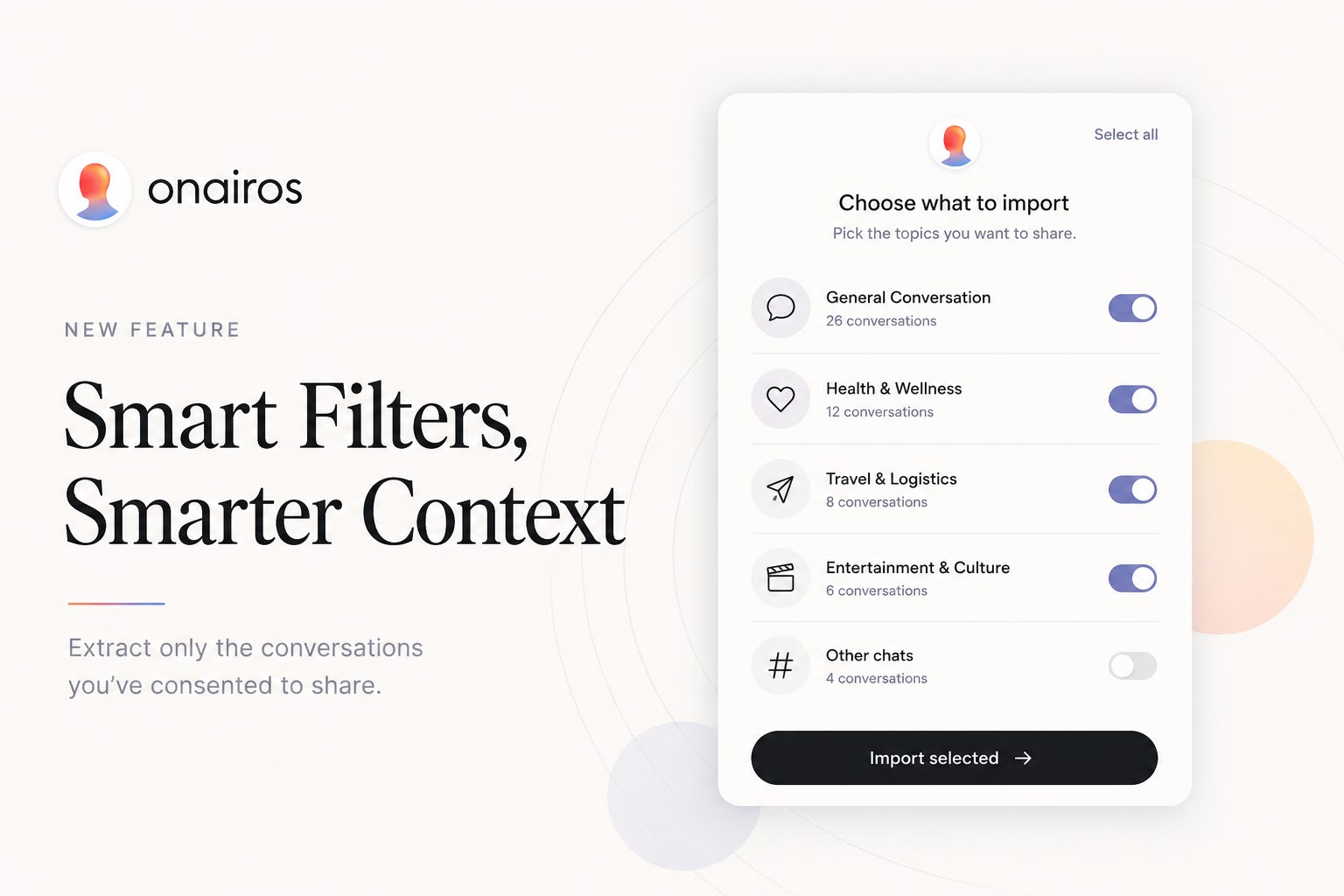
Interactive component
Choose what enters your persona
Toggle topics to preview the consent screen. Sensitive categories start off by default.

Approve the useful slice
Keep the topics that help the app and leave everything else behind.
20 conversations selected
Sensitive topics are off by default and never shared unless you turn them on.
Product preview. No account data is accessed by this demo.
85%
user completion rate
Control creates trust
People say yes when the choice is genuinely theirs.
Across previous Onairos consent experiences, 85% of users who start the flow complete it. Clear requests, visible controls, and revocable access turn privacy from fine print into product trust.
Smart Filter should raise the bar again.
When people can approve topics, exclude sensitive categories, and specify exact keywords or details that must stay out, the request becomes easier to understand and easier to trust. We expect that added control to drive completion even higher while giving apps cleaner, more relevant context.
Teams building with Onairos
Preface
Personalization has usually come with a bad bargain: give an app everything, then trust it to use only what it needs. We built Smart Filter to reverse that relationship.
Smart Filter lets a person decide which connected sources and which relevant topics may be used for an app. Information outside that approved scope is not included in what the app receives. The result is a smaller, more useful context payload that can empower a person's Onairos persona without exposing the rest of their digital life.
What Smart Filter does
Onairos already makes authorization explicit. Raw memories are only available for apps with a necessary need, and the user explicitly approves them. A necessary need means an application in health, wellness, or travel requires specific data points about the user in order to function. This is made explicitly clear to the user: they are told that approved plain data will be streamed to the application, what it will be used for, and that sharing proceeds only with their consent. We continuously review apps claiming necessary need and verify their security and integrity. Read the Persona SDK consent flow and Human API privacy guidance for the relevant implementation rules. Smart Filter adds practical controls to that consent boundary:
- Source control:
allowedPlatformslimits the experience to approved connected sources. - Topic control:
topicFilterselects conversations relevant to a declared purpose instead of returning an undifferentiated history. - Semantic exclusions: a person can describe what should stay out, and Smart Filter interprets related conversation titles instead of relying on exact keyword matches.
- Sensitive-data minimization: sensitive or unnecessary material is excluded from the context delivered to the app by default.
- Purpose-limited context: apps receive the signal needed for the experience, not a general-purpose copy of a person's data.
This applies whether a source is used to produce an abstracted insight or approved text context. The governing idea is the same: only the information the person permits should be used.
Why this matters
An AI travel planner may need to understand someone's travel style. It does not need unrelated conversations about work, health, or family. A learning app may benefit from interests in mathematics and physics. It does not need every text source a person has connected.
Without a filter, more context creates three problems: more privacy risk, more tokens and processing, and more irrelevant noise. Smart Filter improves all three at once.
| Traditional data access | Onairos Smart Filter | |
|---|---|---|
| Scope | Broad account or history access | Approved sources and relevant topics |
| Consent | One large permission | Explicit, purpose-bound authorization |
| App payload | Everything available | Only useful, allowed context |
| Personalization | More data, more noise | Less data, higher signal |
How it works
The app declares what it needs. The person sees the request and chooses whether to allow it. Onairos then enforces that authorization before the app receives persona, preference, abstract, or text context.
For developers, Smart Filter is available in the onairos npm SDK through the same Onairos component used for data authorization:
import { OnairosButton } from "onairos";

<OnairosButton
  requestData={["personality", "preferences", "rawMemories"]}
  allowedPlatforms={["ChatGPT"]}
  topicFilter="travel preferences and trip planning"
  demoMode={true}
  onComplete={(result) => {
    // Use only the context the person authorized.
    console.log(result);
  }}
/>
allowedPlatforms defines which source choices are in scope. topicFilter asks for topic-relevant conversations. demoMode lets a developer show the consent experience as a proof of concept without running the SDK data request. Raw-memory access remains separately gated by the person's explicit authorization; a local checkbox or app request alone is not enough.
The hosted ChatGPT import also supports natural-language exclusions. If someone writes “leave out therapy, medical questions, or my startup,” Smart Filter classifies the approved conversation titles semantically, removes related matches, and only then imports the remaining approved chats. If the semantic classifier is unavailable, it falls back to simple title matching rather than expanding access.
Developers should still ask for the narrowest useful scope. Smart Filter makes privacy-preserving personalization easier, but the best request is always the smallest request that can deliver the experience.
Better privacy is also better infrastructure
Data minimization is often treated as a compliance cost. In an AI application, it is also a performance feature.
Filtering before context reaches the app means fewer irrelevant records, smaller prompts, less downstream processing, and a clearer explanation of why each piece of information is present. Apps can respond faster and reason over higher-quality context. People can understand the value exchange without reading a blanket permission screen.
That is the efficient path to personal AI: move less data, preserve more meaning.
A persona that works for its person
The Onairos persona is designed to be portable across apps while remaining controlled by the person it represents. Smart Filter makes that portability safer. One app can learn the part of a persona needed for music discovery, another the part needed for learning, and another the part needed for travel, without any of them inheriting unrestricted access to everything else.
This is how personal AI should work. A persona should become more useful as it moves, not less private.
Frequently asked questions
What is Onairos Smart Filter?
Smart Filter is a privacy and data-minimization feature in the Onairos SDK. It helps limit app access to approved data sources and topic-relevant context.
Does an app receive all of a user's connected data?
No. The app receives only data covered by the person's authorization and the requested scope. Raw memories require explicit approval.
How do developers use Smart Filter?
Install the latest onairos package from npm, then configure allowedPlatforms for source scope and topicFilter for topic relevance. See the Onairos developer documentation for the complete integration flow.
Get started
Smart Filter is available through the latest Onairos npm package. Read the developer documentation, explore the Onairos developer platform, or review our privacy policy.
Build an app that knows enough to help, and never assumes that means knowing everything.
For developers
Give this to your coding agent.
Your agent can learn the current SDK contract from the package itself, configure consent correctly, and choose between Persona SDK and Human API.
Run npm install onairos, then read node_modules/onairos/llm.txt and set up the Onairos web SDK with API key {YOUR_API_KEY}. Review https://docs.onairos.io/persona/ for the consent and Persona SDK flow, and use https://docs.onairos.io/human-api/ if the app needs memory-enhanced LLM calls.Author
Zion Darko
Founder & CEO
Inventor and Dreamer and CEO.